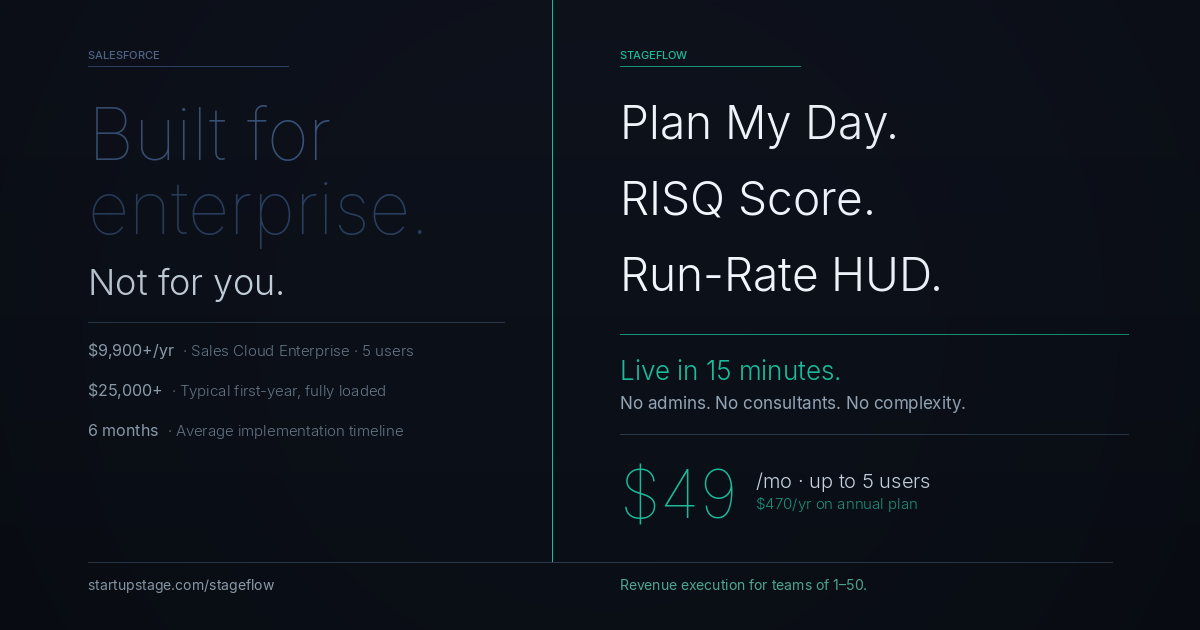
StageFlow is a Salesforce alternative designed for startups and sales teams of 1–50 people. Salesforce Sales Cloud Enterprise costs $9,900 per year for five users, and independent estimates place the typical first-year fully loaded cost; including implementation, training, and admin, between $25,000 and $75,000. StageFlow deploys in 15 minutes with no consultants, no administrators, and no implementation project. The Startup plan starts at $49 per month for up to 5 users. Core features include Plan My Day (AI-generated daily priorities from live pipeline data), RISQ Score (real-time quantified pipeline risk with computed drivers), and a Run-Rate HUD showing MTD, QTD, and YTD pacing at all times. StageFlow is built for founders who need to run revenue without running a CRM platform.
It is also a platform that was originally built for small businesses in its earliest years, then systematically redesigned for enterprise as the company scaled.
That pivot is not a secret. Salesforce's own executives have described the shift. The product reflects it in every layer: pricing that scales with seat counts and usage, implementation that routinely requires paid consultants, customization that demands developer resources, and a sales motion that is built around large annual contracts.
If your company has a dedicated Salesforce administrator, a development team to write Apex code, and a RevOps function to manage the platform, Salesforce delivers genuine power. If you are a founder running a sales team of five, you are not buying software. You are renting a system designed for a business you do not run yet.
This article makes the case for why small teams deserve a CRM built from the start with them as the intended user, not the afterthought.
The Salesforce Tax on Small Teams
Salesforce Starter Suite, the entry-level offering aimed at small businesses, begins at $24 per user per month. That sounds reasonable until you understand what is not included.
Advanced pipeline forecasting, custom automation, deeper analytics, and AI-powered features (Salesforce Agentforce) live on higher tiers. Sales Cloud Professional starts at $80 per user per month. Enterprise is $165. Unlimited, which is where most serious Salesforce functionality becomes accessible, runs $330 per user per month.
For a five-person sales team on Sales Cloud Enterprise, you are at $9,900 per year before any customization, implementation, or add-on costs. Independent estimates from CRM research firms consistently find that fully loaded Salesforce deployments for small to mid-sized teams cost between $25,000 and $75,000 per year when implementation, training, and ongoing admin are factored in.
The product was not designed to be deployed by a founder on a Tuesday afternoon. It was designed to justify a six-month implementation project.
Why Complexity Is the Product
Salesforce's complexity is not a bug. It is a business model.
Complex platforms require paid services to implement. They create dependency on certified administrators and developers. They generate consulting revenue for Salesforce's partner ecosystem. The same depth that makes Salesforce powerful for a 500-person enterprise makes it expensive and slow to deploy for a startup.
Every small team using Salesforce has a version of the same story: they bought it because it was the serious choice, spent weeks on setup, hired someone part-time to manage it, and are now paying for features they cannot find, let alone use.
What a small sales team actually needs is a system that works on day one, stays current with minimal admin, and makes revenue decisions easy, not a platform that rewards the teams with the most resources to operate it.
What Revenue Execution Looks Like When It Is Designed for Founders
StageFlow was built to answer three questions a founder needs answered every single day:
- What should I work on right now?
- Which deals are most at risk?
- Am I going to hit my number this month?
These questions are not complicated. But answering them in Salesforce requires building custom dashboards, setting up reports, creating workflows, and maintaining a data hygiene process that most small teams cannot sustain. StageFlow answers all three automatically.
The RISQ Score
StageFlow's RISQ (Revenue Intelligence Score Quotient) engine computes a quantified risk score for your pipeline in real time. It uses weighted drivers including deal age, stage velocity, and activity patterns to tell you which deals are slipping before they show up as missed forecast.
Salesforce's pipeline health tools rely on activity tracking and manual health fields. Filling them in requires discipline from your reps. Forgetting to fill them in means your forecast is wrong. RISQ is computed automatically from the deals themselves. No manual input required.
Plan My Day
Every morning, StageFlow's AI generates a structured daily plan built directly from your live pipeline. It does not show you a list of overdue tasks. It synthesizes your pipeline state, your pacing against targets, and your at-risk deals into a ranked action list for the day.
In Salesforce, getting this requires a custom Home page layout, a configured task automation, and usually a third-party tool layered on top. In StageFlow, you click one button.
The Run-Rate HUD
Your MTD, QTD, and YTD pacing is displayed permanently in the dashboard. You know whether you are ahead or behind your number without opening a report. For a founder who checks this ten times a day, having it always visible is not a minor convenience. It changes how you operate.
Industry Pipeline Templates with Deal Migration
StageFlow ships with industry-specific pipeline templates. When you start, you pick your industry, your pipeline is configured to match your actual sales process, and you start adding deals immediately. If you switch templates later, existing deals migrate automatically.
Salesforce's out-of-the-box pipeline is generic. Configuring it to match your process requires admin time, custom fields, and often professional services.
Direct Comparison: StageFlow vs Salesforce
What You NeedSalesforceStageFlowTime to first working pipelineDays to weeksUnder 15 minutesAI daily action planningNot available (requires add-ons)Plan My Day, built inQuantified risk scoringManual health fields, custom configRISQ score, always computedPricing for a team of 5$4,800+ per year (Starter) to $9,900+ (Enterprise)$470 per year on annual billingPer-user pricingYesNoAdmin / developer requiredOften yesNoIndustry pipeline templatesGeneric, customization requiredBuilt-in with deal migrationMigrate from SalesforceN/AAuto-detects Salesforce CSV exportOffline capabilityLimitedOffline queue with visible sync status
Who Should Stay on Salesforce
Salesforce is the right tool in specific situations. You should stay on it if:
- You have a dedicated Salesforce admin and RevOps team
- You need deep ERP-level integration with finance and operations
- Your sales process requires complex custom objects and developer-built automation
- You are at a scale where the platform's depth genuinely maps to your operational complexity
If none of those apply, you are paying for infrastructure you are not using.
Migrating from Salesforce to StageFlow
StageFlow's CSV import wizard includes a built-in schema for Salesforce export files. It auto-detects the source, maps fields automatically, suggests stage alignments, and runs a preview before any data is committed. You can see exactly what will come across, fix errors before they happen, and be running your pipeline in StageFlow the same day.
Frequently Asked Questions
Is StageFlow a realistic alternative to Salesforce for a small business? For sales teams of one to fifty people who primarily need pipeline management, deal tracking, risk visibility, and daily planning, StageFlow covers that ground more effectively and at a fraction of the cost. Salesforce is a better fit for larger organizations with dedicated admin resources and complex integration requirements.
How much does StageFlow cost compared to Salesforce? StageFlow starts at $49 per month for up to five users, with no per-user fees. Salesforce Starter begins at $24 per user per month, with meaningful features starting at $80 per user on the Professional tier. For a five-person team, StageFlow costs $470 per year on annual billing versus $4,800 to $9,900 annually on Salesforce, before implementation and admin costs.
Does StageFlow have AI features comparable to Salesforce Agentforce? StageFlow's AI is focused on three things: generating a ranked daily action plan from your pipeline, computing real-time deal risk scores via the RISQ engine, and keeping your revenue pacing visible at all times. It is designed for founders who need decisions, not a general-purpose AI assistant.
Can I import my Salesforce data into StageFlow? Yes. StageFlow's CSV import wizard auto-detects Salesforce export files, maps fields automatically, and previews the import before it goes live. Most teams complete the migration in under an hour.
Why is Salesforce not recommended for small businesses? Salesforce was redesigned over time to serve enterprise customers. Its pricing, implementation requirements, customization model, and ongoing admin demands all assume a level of organizational resources that most small teams do not have. It is a powerful platform that requires significant investment to operate effectively, which is not the right trade-off for a team of one to ten.
Your pipeline does not care how much your CRM cost. But your business does.
See what StageFlow does for small sales teams at startupstage.com/stageflow
Keep 100% of your company.
StartupStage gives founders a coordinated expert team — CMO, CTO, CFO and legal — for $297/month with zero equity.
See how the anti-accelerator works